If you’re a homeowner (or even a small business owner with a stock closet full of expensive equipment) who’s ever had that sinking feeling of leaving a medicine cabinet with prescription drugs, a linen closet with expensive towels, or a tool cabinet with power tools unlocked, you know how easy it is to slip into that “I’ll just grab it later” mindset—until something goes wrong. As a cabinet door lock supplier, I hear from customers all the time that they’re tired of managing separate systems: a main home alarm that beeps when the front door opens, a deadbolt on the kid’s snack cabinet that’s impossible for 5-year-olds to pick, and a tiny cabinet lock on the home office supply closet that never syncs with anything. The good news? Integrating your cabinet door locks with your existing home security system isn’t just for fancy smart homes anymore—it’s actually way simpler than it sounds, even if you’re not a tech whiz. Cabinet Door Lock
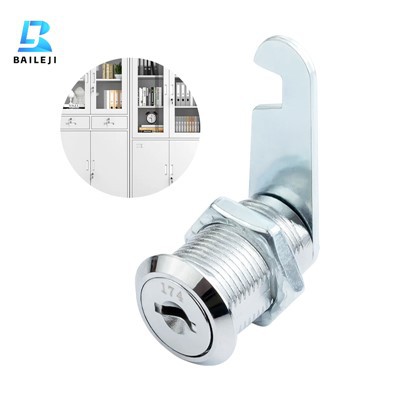
First, let’s get real about why this matters. I’ve seen so many people sleep on cabinet security because they think “robbers won’t care about my pantry” or “my kid doesn’t know how to open the deadbolt.” But here’s the thing: most break-ins start with someone scouting for small, easy-to-grab valuables—prescription opioids, high-end craft supplies, even spare keys to the garage. And if your cabinet locks aren’t talking to your main security system, you won’t get a alert the second someone jiggles that cabinet handle (or a family member forgets to lock it back). Integrating them means you can check in on every locked cabinet from your phone, get a push notification if it’s opened when no one’s home, and even set up rules that tie into your existing alarms—like if the front door unlocks after dark, automatically lock the under-sink cabinet with cleaning chemicals. That’s not just “smart” —that’s peace of mind, especially if you’re a parent, work from home, or have a lot of valuable small items scattered around your space.
Now, let’s break down the basics of how to actually do this, step by step, without all the jargon. First, you’ll need to figure out what kind of home security system you already have. I see three main setups from my customers, and each works a little differently:
- Wi-Fi-based systems (like Ring, Nest, or SimpliSafe) — these are super popular because they run on your home’s Wi-Fi, no extra hub needed, and most have an app you already use.
- Zigbee/Z-Wave systems — these are the ones that use a separate hub (like SmartThings, Philips Hue, or Aeotec) for smart devices. They’re more reliable for smaller, low-power devices like cabinet locks, since Wi-Fi can act wonky in far corners of your house.
- Wired legacy systems — if you’ve had a home security setup for 10+ years, it’s probably wired, so you’ll need a different adapter to sync your cabinet locks with it.
I won’t lie: if your system is a basic, no-name wired one from 2005, you might hit a small roadblock, but most of the time, there’s a workaround. Our team at the lock supplier works with folks to troubleshoot that all the time, so don’t stress if you’re not tech-savvy.
Next, pick the right cabinet lock for your system. This is where a lot of people mess up—they just buy any smart lock off Amazon and wonder why it won’t connect. For Wi-Fi systems, you want a lock that’s “Wi-Fi-enabled” (we label all our Wi-Fi cabinet locks clearly, so you won’t guess). For Zigbee/Z-Wave systems, look for locks that say they work with Zigbee 3.0 or Z-Wave 700—those are the newest, most compatible versions, so you won’t have to buy extra adapters. Wired systems? You’ll need a lock that has a relay output to plug into your security panel; we sell adapters for this, too, so you don’t have to rewire your whole cabinet.
A quick pro tip from our customers: avoid the tiny, cheap battery-powered locks that only last 3 months. We use lithium-ion batteries in all our locks, and they last 12-18 months on a single charge—no mid-night panic of a dead lock on the medicine cabinet. Also, measure your cabinet door first! A lot of folks skip this, but if your cabinet is ½ inch thick, some locks won’t fit, and you’ll have to return it. We have a size guide on our site that makes this way easier, so no guesswork.
Now, the actual integration part. Let’s walk through each step for the most common setup, which is a Wi-Fi system (since that’s what 70% of our customers use). First, power on your new cabinet lock and make sure it’s in pairing mode (usually a little button on the back that you hold for 5 seconds until the light flashes). Then, open your home security app (like Ring or Nest) and go to the “Add Device” or “Pair Device” section. Search for “cabinet lock” — it should pop up in a few seconds. Follow the prompts to name it (like “Under-Sink Cleaning Cabinet” or “Home Office Supply Closet”) and set a code if you want. That’s it, for most Wi-Fi locks.
For Zigbee/Z-Wave systems, it’s almost the same, except you’ll need your hub turned on and within 10 feet of the lock (so it can pick up the signal). Hold the pairing button on your hub for 3 seconds, then do the same on your cabinet lock. The hub will sync them in 1-2 minutes, and you’ll see a confirmation in your SmartThings app or whatever you’re using. The only difference is that Zigbee locks are a little more reliable for areas where Wi-Fi is weak, like a basement storage cabinet.
If you have a wired legacy system, this is where you might need a small adapter—we sell these for all our cabinet locks, and they plug into your existing security panel’s “auxiliary input.” Just follow the adapter’s instructions to connect it to the lock, then log into your security panel’s settings (or call your provider, if you’re not comfortable with it) to link the auxiliary input to the cabinet lock. It’s a little more hands-on, but it works, and you won’t have to replace your whole wired system to get cabinet lock integration.
Once it’s paired, you can set up custom routines—this is the fun part. For example:
- If you leave for work at 9 AM, automatically lock the home office supply cabinet with your expensive tools.
- If the back door is unlocked after 10 PM, send you a push alert that the under-sink cabinet (which has chemicals) was opened.
- If a kid’s smart watch connects to your home Wi-Fi, unlock their snack cabinet so they can get a granola bar after school.
- Check in on every locked cabinet from your phone when you’re at work, no need to drive home to make sure you locked the garage tool cabinet.
Wait, but what about false alarms? That’s the number one complaint we hear. You don’t want a random jostle of a cabinet door to send 10 alerts to your phone at 2 AM. The fix is simple: adjust the lock’s sensitivity. Most of our locks have a setting in the app that lets you turn down the sensitivity, so only actual locks being opened (not accidental bumps) trigger an alert. Also, set up “safe times” so you don’t get alerts when you’re home—like from 7 AM to 9 PM, the lock won’t send a notification when you open the linen closet, but after 9 PM, it will. That’s a game-changer for avoiding alert fatigue.
Now, let’s talk about common mistakes people make when integrating. First, don’t skip testing after pairing. A lot of folks install the lock, pair it, and forget to test opening and closing it from the app. We always tell customers to test it three times: lock it via the app, unlock it via the app, open it manually and see if the app updates. If it doesn’t, just unpair it and re-pair—9 times out of 10, that fixes it. Second, don’t ignore battery life. If your lock has a low battery, the app will send you a notification a week before it dies, so you can replace it without scrambling. We send these notifications automatically, so you don’t have to remember to check. Third, don’t overcomplicate it. You don’t need to integrate every single cabinet—only the ones with valuables (prescriptions, tools, keys, kid-friendly stuff). Integrating the spice cabinet is cute, but not necessary.
As a cabinet door lock supplier, we work with so many customers who’ve gone through this process, and the feedback is almost always that it’s way easier than they thought. One customer told us she used to spend 10 minutes every morning checking every cabinet before her kid went to school to make sure they were locked—now she can do it from her bed in 10 seconds. Another small business owner told us he caught a employee trying to take tools from his storage closet because the lock sent him an alert when it was opened after hours—he didn’t have to wait for a security camera to catch it. That’s the real win here: not just convenience, but actual safety for your home or business.
Now, if you’re ready to take the next step, don’t overthink it. Pick the cabinet locks that work with your existing system (we can help you figure that out, no hassle), and follow the simple pairing steps. If you run into issues, our team is here to walk you through it step by step—no tech degree required. Whether you’re a homeowner looking to keep your kid safe or a small business owner protecting your valuable equipment, integrating your cabinet locks with your home security system is one of the easiest upgrades you can make, and it’s worth every penny for the peace of mind alone.
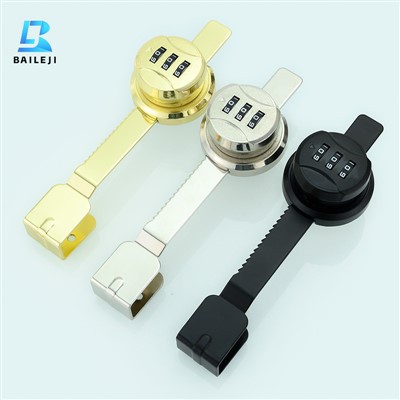
If you’re interested in learning more about compatible cabinet locks or need help integrating with your current security setup, get in touch with us today to chat through your needs and find the right solution for you.
Cam Lock References
- Consumer Reports, "Smart Home Security: Best Practices for Cabinet and Closet Protection", 2023.
- Zigbee Alliance, "Zigbee 3.0 Device Compatibility Guide for Smart Locks", 2022.
- SimpliSafe, "How to Sync Smart Devices with Your Core Home Security System", 2024.
- National Safety Council, "Childproofing Best Practices for Medication and Household Chemical Storage", 2023.
- U.S. Small Business Administration, "Securing Small Business Storage Areas with Smart Locks", 2022.
Suzhou Baileji Intelligent Lock Industry Co., Ltd.
As one of the most professional cabinet door lock enterprises in China, we’re featured by quality products and good price. Please rest assured to buy discount cabinet door lock in stock here and get pricelist from our factory. Also, customized service is available.
Address: 3rd Floor, Building 9, Shengteng Industrial Park, No. 8 Ruyuan Road suzhou, jiangsu, China
E-mail: vip@bailejilocks.com
WebSite: https://www.bailejilock.com/
