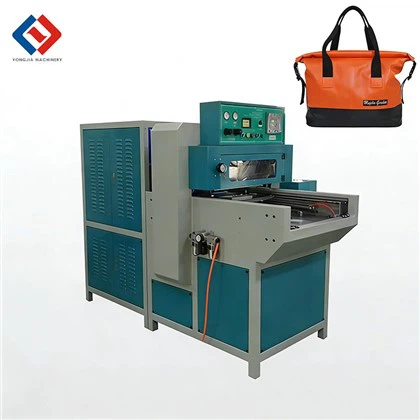
As a supplier of HF welding machines, I understand the significance of keeping the software of these machines up – to – date. In the dynamic manufacturing environment, software upgrades are crucial for enhancing machine performance, ensuring safety, and meeting evolving industry standards. This blog aims to guide you on how to upgrade the software of an HF welding machine. HF Welding Machine
Understanding the Need for Software Upgrades
Before delving into the upgrade process, it’s essential to comprehend why software upgrades are necessary. First and foremost, software upgrades often bring performance improvements. New algorithms can optimize the welding process, leading to more precise welds, faster production times, and better quality control. For example, an upgrade might adjust the frequency and power output of the HF welding machine in real – time based on the material being welded, resulting in a more consistent and reliable weld.
Secondly, upgrades are important for security. As in any digital system, HF welding machines are vulnerable to cyber threats. Software updates can patch security holes, protecting your machine from unauthorized access and potential sabotage. This is especially critical in industrial settings where the machines may be connected to a network.
Lastly, regulatory requirements change over time. Governments and industry associations frequently introduce new standards for safety, emissions, and energy efficiency. By upgrading the software of your HF welding machine, you can ensure that it remains compliant with these regulations, avoiding potential fines and disruptions to your operations.
Pre – upgrade Preparations
Gather Information
The first step in upgrading the software of an HF welding machine is to gather all relevant information. Identify the model and serial number of your machine. This information is usually found on a label attached to the machine’s body. You can then contact the manufacturer (in this case, our company) to obtain details about the available software upgrades. The manufacturer’s technical support team can also provide guidance on whether the upgrade is suitable for your specific machine and application.
Backup Data
Before initiating any upgrade, it’s crucial to back up all the existing data on the machine. This includes welding parameters, user settings, and any custom programs that you have created. Losing this data during the upgrade process can cause significant disruptions to your production. Most modern HF welding machines have built – in data backup functions. You can use a USB drive or an external storage device to save the data. Make sure to test the backup to ensure that all the information has been successfully saved.
Check Hardware Compatibility
Software upgrades may require certain hardware specifications to function correctly. Check if your HF welding machine meets the hardware requirements for the new software version. This may involve verifying the processor speed, memory capacity, and storage space. If your machine does not meet the requirements, you may need to upgrade the hardware components before proceeding with the software upgrade. Our technical support team can assist you in determining the necessary hardware upgrades.
The Upgrade Process
Download the Software
Once you have gathered all the necessary information and completed the pre – upgrade preparations, you can proceed to download the software upgrade. Visit the manufacturer’s official website and navigate to the support or download section. Locate the software upgrade package that is compatible with your HF welding machine model and serial number. Make sure to download the package from a trusted source to avoid downloading malware or corrupted files.
Transfer the Software to the Machine
After downloading the software upgrade package, transfer it to the HF welding machine. If your machine has a built – in USB port, you can copy the package to a USB drive and insert it into the machine. Some machines may also support wireless transfer methods such as Wi – Fi or Bluetooth. Follow the machine’s user manual for instructions on how to transfer the software.
Install the Software
Once the software upgrade package is transferred to the machine, start the installation process. The installation procedure may vary depending on the machine model. In most cases, you need to access the machine’s software management menu and select the option to install the new software. Follow the on – screen prompts carefully. The machine may need to restart during the installation process. Do not interrupt the installation, as this can lead to software errors or even damage the machine.
Testing and Validation
After the installation is complete, it’s essential to test the machine to ensure that the software upgrade has been successful. Run a series of test welds using different materials and settings. Check the weld quality, production speed, and other performance indicators. Compare the results with the pre – upgrade performance. If you notice any issues, such as abnormal weld patterns or error messages, contact our technical support team immediately. They can diagnose the problem and provide solutions.
Post – upgrade Considerations
Training
A software upgrade may introduce new features and functions to the HF welding machine. It’s important to provide training to the operators who will be using the machine. Our company offers comprehensive training programs, either on – site or online. These programs cover the new features of the software, how to operate the machine with the upgraded software, and troubleshooting techniques. Proper training ensures that the operators can make the most of the software upgrade and maintain high – quality production.
Maintenance
Regular maintenance is crucial for the long – term performance of the HF welding machine with the upgraded software. Follow the manufacturer’s maintenance schedule, which may include tasks such as cleaning, lubrication, and component replacement. Our company also provides maintenance services and can assist you in developing a maintenance plan tailored to your specific machine and production requirements.
Feedback

We value your feedback on the software upgrade process. If you have any suggestions or encounter any problems during the upgrade, please let us know. Your feedback helps us improve our software and support services. We are committed to providing the best possible experience for our customers.
Contact for Purchase and Consultation
C Type Welding Machine If you are considering upgrading your HF welding machine’s software or purchasing a new machine, I encourage you to reach out to us. As an experienced supplier of HF welding machines, we have a team of experts who can provide you with detailed information on the software upgrade process, as well as recommend the most suitable machine for your business needs. Whether you are a small – scale manufacturer or a large industrial enterprise, we are ready to assist you in achieving the best results with our high – quality HF welding machines and software solutions.
References
- Industry Standards for HF Welding Machines, [Publication Date]
- Manufacturer’s User Manual for HF Welding Machines, [Version]
Dongguan Yongjia Machinery Equipment Co., Ltd.
We are one of the most reliable hf welding machine manufacturers and suppliers in China, specialized in providing high quality customized service. Please feel free to wholesale advanced hf welding machine at low price from our factory. For quotation, contact us now.
Address: No. 240, Chashan South Road, Chashan Town, Dongguan City, Guangdong Province, China
E-mail: info@yjwelding.com
WebSite: https://www.yjhighfrequencymachine.com/
